



I still remember the night the power went out during a three-day storm and my phone, laptop and small fan all went dark. I packed the Jackery Explorer 1000 v2 the next morning because, honestly, I wanted to stop living the candle-lit life. In this post I walk through why the Explorer 1000 v2 became my go-to portable power station, what chores it handled, how it behaved with solar panels, and when I’d choose a different model.
My odd little test: three days off-grid (and the fan that saved me)
My “test” wasn’t planned. A storm knocked out power at home, and I ended up doing three days of basics-only living. After that, I packed the Jackery Explorer 1000 v2 on a weekend camping trip and treated it like a real-world trial: same habits, same devices, no babying it. Specs are nice, but I wanted to see if this portable power station felt dependable when I was tired, cold, and not in the mood to troubleshoot.
What I brought (and why it mattered)
The Explorer 1000 v2 has 1,070Wh capacity in a 23.8 lb body, which is light enough that I didn’t resent moving it around camp. The quiet operation was the first thing I noticed—Jackery rates it around 30 dB, and that matched my experience. At night it was more “soft room noise” than “generator.”
Fan (the hero): steady airflow for sleeping
Laptop: work and downloads
CPAP machines: the non-negotiable test
Electric blanket: short bursts, not all night
Overnight use: fan + CPAP without the noise stress
I ran the fan every night and used my CPAP on two of them. Having three pure sine wave AC outlets (with 1500W continuous / 2000W surge) meant I didn’t have to juggle plugs. The bigger win was comfort: no loud cycling, no bright screen glare, and no “is this thing going to beep?” anxiety. That low-noise profile is exactly what I want when CPAP machines are involved.
The app feature I didn’t expect to care about: emergency charging
Back at home during the outage, I used the Jackery App to trigger emergency charging (Jackery calls it emergency super charge). From AC, it can go 0–100% in about 1 hour, which is the difference between “I’ll risk it” and “I’m covered.” I also toggled energy-saving and a quieter overnight mode when I didn’t need full output.
Tiny tangent: I left the light on all day
I accidentally left a camp light running for a full day. I expected to pay for it that night, but the remaining charge was still better than I deserved. That’s when the long-life battery angle clicked for me.
Dr. Emily Harris: "LiFePO4 battery chemistry changes the game for long-term reliability in portable power."
With a LiFePO4 pack rated for 4,000+ cycles, it feels built for repeated use—not just one emergency.
Specs deep dive: what the Jackery Explorer 1000 v2 actually offers
Battery capacity and LiFePO4 battery longevity
The first spec I look at is battery capacity, and the Jackery Explorer 1000 v2 lands at 1,070Wh. That’s a practical size for real use: running a laptop setup, charging phones, keeping a small fridge going for a while, or covering basic emergency needs without jumping to a huge, heavy unit.
It also uses a LiFePO4 battery, which matters more than most people think. Jackery rates it for 4,000+ charge cycles, which lines up with the idea of using it often (camping, RV weekends, storm season) without feeling like every recharge is “wearing it out.” In many use cases, that cycle rating can translate to 10+ years of service.
AC output: 1500W continuous power for real appliances
On the inverter side, the Explorer 1000 v2 provides 1500W continuous AC output with up to 2000W surge. The surge headroom is important for transient loads—things that spike at startup like small compressors, some power tools, or certain kitchen devices.
The AC outlets are pure sine wave, which is what I want when I’m powering sensitive electronics like laptops, CPAP machines, or camera chargers.
Ports: AC outlets, USB-C ports, and DC options
For day-to-day convenience, the port selection is strong and modern:
3× pure sine wave AC outlets
2× USB-C ports with 100W Power Delivery each
2× USB-A ports
DC car port
The dual USB-C ports are a big deal for me because they handle high-wattage laptop charging without needing an AC brick.
Fast charging and app-based control
Fast charging is another reason I trust it. Over AC, it can hit 0–80% in about 1.7 hours. When time really matters, the Jackery App offers an emergency mode that can push 0–100% in 1 hour. The app also includes quiet overnight and energy-saving modes, which helps when I’m trying to sleep near it.
Portability, safety, and warranty
At roughly 22–23.8 lbs, it’s manageable, especially with the foldable handle and side grips. For protection, it uses ChargeShield 2.0 with 62 safety layers, plus a 5-year warranty (3+2).
Solar input supports 200–400W, and it’s commonly paired with Jackery’s bifacial 200W panels and extension cables for easier placement.
Tom Alvarez (Outdoor Tech Reviewer): "The Explorer 1000 v2 strikes a rare balance between weight, power, and longevity."
How it performed in everyday scenarios — camping, RV, and home backup
Camping: portable power that lasted through the night
On camping nights, the Jackery Explorer 1000 v2 felt like the right balance of capacity and carry. With 1,070Wh on tap and a 23.8 lb body, I could set it near the tent and run a small 12V fridge, a couple of LED lights, and steady phone charging across the night with power to spare. I also tried an electric blanket on a chilly evening and it kept me pleasantly warm without draining the battery as fast as I expected.
It stayed quiet (around 30 dB) and never got alarmingly hot under moderate loads, which matters when it’s sitting close to sleeping gear.
RV trips: van life-friendly size, strong AC output
For RV weekends and van life setups, the Explorer 1000 v2 fit into typical storage spaces and was easy to move thanks to the handle and side grips. The 1500W continuous output (with 2000W surge) handled my everyday mix: laptops, fans, and small kitchen gadgets like a blender or coffee gear—just not all at once at full tilt.
Laura Chen (RV Enthusiast & Blogger): "For weekend trips, the Explorer 1000 v2 felt like the one appliance I could trust to power essentials without drama."
I kept an eye on startup loads, since some fridges and pumps can spike briefly. That surge headroom helped, but I still avoided stacking multiple high-draw devices at the same moment.
Home backup: keeping the basics alive
During short outages, it worked well as simple home backup. I used it to keep a router, phones, and small medical devices running. The pure sine wave AC felt “clean” for sensitive electronics, and the dual USB-C ports (including 100W PD) made it easy to top off modern laptops without hunting for adapters.
CPAP machines: safe overnight testing
CPAP machines are a big reason many people choose this model, and my testing matched that. Using the pure sine wave AC outlet, it ran overnight without issues. Your results will vary based on pressure settings and whether you use a heated hose or humidifier, but the power delivery felt stable.
Runtime estimate + solar panels for longer off-grid time
My quick runtime estimate starts with capacity and device draw:
Runtime (hours) ≈ 1070Wh × 0.85 ÷ device watts
For longer trips, pairing it with solar panels (especially a 200W panel, with roughly 200–400W input possible in good sun) noticeably extended off-grid time on clear days.
Alternatives I looked at (and when I'd pick them)
Before landing on the Jackery Explorer 1000 v2, I compared a range of solar generator and portable power station options. The market is wide: I saw battery capacity from about 146Wh to 3,072Wh, and prices from roughly $94.99 to $1,049+. A big trend is that many brands now use a LiFePO4 battery for longer cycle life, so the decision often comes down to capacity, ports, and charging limits—not chemistry alone.
Marcus Lee (Energy Analyst): "Match the battery capacity to your worst-case scenario — that's the simplest buying rule."
GRECELL Solar Generator (around 146Wh): for lightweight day trips
If I only needed to top off a phone, camera batteries, a small light, or a tablet, I’d look at the compact GRECELL-style units around 146Wh. They’re easy to carry and usually the cheapest way to get basic backup power. The tradeoff is simple: limited AC output (or fewer AC outlets), and not enough runtime for heat, cooking, or anything that cycles like a fridge.
PECRON Portable Power Station: for weekend camping and mixed devices
For a typical weekend, PECRON’s mid-range models made sense on paper: more usable capacity than the tiny units, more ports, and often decent solar input. This is the category I’d pick if I wanted to run a fan overnight, charge laptops, and keep a small cooler going—without jumping to heavy, home-backup sizes.
GROWATT INFINITY 2000 / S2000 (up to 3,072Wh): for home backup, not lightweight travel
When I looked at higher-capacity options like the GROWATT INFINITY 2000 and especially the S2000 (3,072Wh), the goal shifts. These are built for longer outages and larger appliances. They can be a better fit if you want to stretch runtime for essentials at home, but they’re not what I’d call “grab-and-go” for camping.
How I compare any solar generator quickly
Battery capacity: Wh matched to my worst-case load and hours needed
Ports: number of AC outlets, USB-C PD, DC car port (what I actually use)
AC output + surge: whether it can start motors and handle spikes
Solar input limits: panel wattage supported (200W panels are common, but not universal)
Battery chemistry: I prefer LiFePO4 battery models for longevity
Price drop timing: sales can flip the value fast, so I track discounts

Solar charging, accessories, and maximizing off-grid runtime
Solar input and solar panels I actually recommend
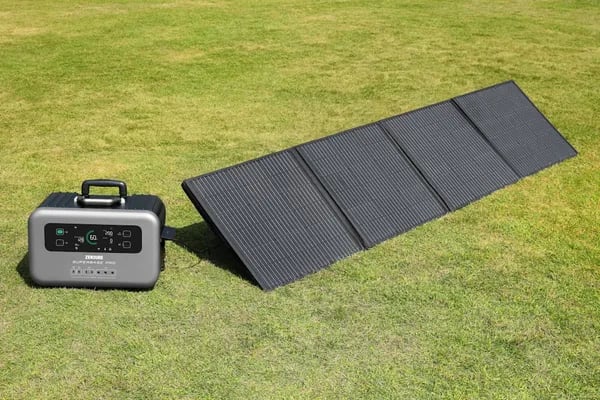
The Explorer 1000 v2 is where portable power starts to feel truly off-grid, because it supports solar input in the 200–400W range (depending on the model details and how you set up your panels). For me, the best match is a 200W bifacial solar panel. Bifacial designs can pick up extra energy from reflected light off sand, snow, or even a light-colored campsite pad, which helps real-world solar charging when conditions aren’t perfect.
Samantha Ortiz (Solar Installer): "Pairing panels that match the station's MPPT limits is the fastest path to meaningful off-grid time."
I keep that quote in mind because solar pairing isn’t just “more watts is better.” You want panels that stay within the unit’s MPPT controller limits (voltage/current) so you don’t waste potential or run into compatibility issues. Before buying any third-party solar panels, I verify the MPPT specs and the panel’s ratings.
Accessories that make solar charging easier to deploy
Two small add-ons make a big difference when I’m parked in shade or the panels need to sit far from the power station:
16.4 ft DC extension cable for flexible panel placement without moving the station.
14AWG car charging cable for topping up while driving or when solar is limited.
That car option is my “backup plan” on long road trips—if clouds roll in for two days, I can still recover some runtime between stops.
Planning solar charging time (I plan conservatively)
Charging estimates depend on sun angle, temperature, shading, and panel wattage. In ideal midday sun, 200W+ panels can dramatically shorten recharge time and extend off-grid stays, but I assume less than the label rating. I watch the app to see real-time input and adjust panel angle during the day.
What I’m powering | How I stretch runtime |
|---|---|
Phones, laptops, lights | Prioritize USB-C PD, avoid running AC inverter unnecessarily |
Fans/blankets | Use lower settings, cycle on/off, recharge during peak sun |
Battery management to protect charge cycles
The LiFePO4 pack is rated for 4,000+ charge cycles, but I still treat it well. I use energy-saving mode, avoid constant high-watt draws, and don’t leave heavy loads running “just because I can.” For long-term storage, I keep it around 50% charge and check it occasionally. Solar topping also helps me rely less on the grid, which fits how I use this station.
Warranty, defects, and user support — the messy bits
My take on the warranty info (and what “3+2 years” really means)
Portable power is only “reliable” if the company stands behind it when something goes wrong. For the Jackery Explorer 1000 v2, I keep seeing warranty info that points to a 5-year warranty in some configurations, often described as 3+2 years (a standard period plus an extended portion). Because policies can vary by seller, bundle, and region, I treat the warranty as something to confirm at checkout and then save as a screenshot.
What user reviews say: mostly great, but defects happen
Across many platforms, user reviews are consistently strong—often above 4.5 out of 5 stars—and most owners describe the Explorer 1000 v2 as quiet, easy to use, and dependable for camping and emergency portable power. Still, a small number of buyers report issues right out of the box, including defective USB ports or other delivery defects. That’s not the dominant story, but it’s common enough that I plan for it.
Support can depend on where you buy
One pattern I noticed: the store of purchase matters. Buying Jackery direct usually means you follow Jackery’s process from day one. Buying on Amazon can be smooth too (and it often ranks as a top outdoor generator there), but returns and warranty steps may run through Amazon first, then Jackery—especially after the return window. Marketplace sellers can add extra friction, so I avoid third-party listings unless the seller and policy are crystal clear.
Michael Grant (Consumer Rights Advocate): "Documenting the first hours of use makes warranty claims far less painful."
What I do on day 1 (to make returns or warranty claims easier)
Unbox and inspect: take photos of the unit, ports, and serial label.
Test every port: AC outlets, USB-C, USB-A, and the car port with real devices.
Run a short log: note charge level, charging method, and any odd behavior.
Register promptly: do it the same day and save confirmation emails.
Price drop makes it easier to accept the “what if”
The recent price drop—often from around $1,299 to roughly $699–$779—makes the value feel much stronger, even knowing rare defects can happen. If I were powering critical medical devices, I’d also consider extended coverage and keep a backup plan, because no single battery box should be a single point of failure.
Buying guide: how I decide what to buy (practical checklist)
1) Start with my device list (and do a quick Wh math check)
I write down every device I want to run and how long I need it. A simple watt-hour check helps me avoid buying an undersized portable power station.
Wh needed = device watts × hours
Example: 50W × 10 hours = 500Wh
Then I add a buffer (20–30%) because real use isn’t perfect and I don’t want frequent deep discharges.
2) Match battery capacity to real use
I compare my total Wh to the unit’s battery capacity. The Jackery Explorer 1000 v2 is rated at 1,070Wh, which is a comfortable middle ground for camping and short outages. If my list regularly pushes past ~1,200–1,500Wh, I look at bigger options (often >2000Wh) instead of hoping a smaller unit will “stretch.”
3) Decide: portability (22–24 lbs) or raw capacity
Weight matters more than I expect. The Explorer 1000 v2 sits around 22–23.8 lbs, which I can move one-handed with the handle. If I’m mostly at home backup, I’ll accept heavier units for more capacity.
4) Check AC output, surge, and pure sine wave
I look at specifications for continuous watts and start-up surge. The Explorer 1000 v2 is 1500W continuous with about 2000W surge. That’s important for appliances that spike at startup (small fridge, some power tools). If I’m powering a CPAP or sensitive electronics, I confirm pure sine wave AC output and that the continuous rating covers my load.
5) Port selection matters (especially USB-C PD)
Modern charging is all about USB-C. I prioritize units with USB-C PD so I can fast-charge laptops without an AC brick. The Explorer 1000 v2 includes 2 × 100W USB-C PD, plus USB-A, DC, and three AC outlets—good coverage for mixed gear.
6) Charging time, solar input, and real-world accessories
I compare charging time across AC, car, and solar. Fast options (including app-based emergency charging) are valuable when weather or time is tight. I also check solar panel compatibility and practical items like cable length (extension cables can make a big difference at camp).
7) Warranty info, testing on arrival, and price timing
I read the warranty info and I test every port immediately—AC, USB-C, USB-A, and DC—because defects can happen. I also watch for price drops; deals can make a higher-tier model the better value.
Hannah Price (Outdoor Gear Buyer): "Always overestimate your power needs — it’s cheaper than buying a second unit later."
Battery capacity (Wh) vs my calculated Wh needs
AC output (W) and surge rating
Port selection (USB-C PD, count, placement)
Weight and handle/grip design
Solar input limits + panel compatibility
Warranty info + return process, then test on day one
Wild cards: two scenarios and a quote to make you think
Scenario 1: a weekend remote film shoot (portable power meets real-world port planning)
If I had to power a small weekend film shoot, I’d treat the Jackery Explorer 1000 v2 like my quiet “base camp” for portable power. A typical mix might include camera battery chargers, a laptop backup (often 60–100W), and one or two LED panels that can swing anywhere from 50–300W depending on brightness. This is where I plan port allocation on purpose: I’d keep sensitive gear on the pure sine wave AC outlets, then use the dual USB-C PD 100W ports for modern laptop or camera accessories. That split reduces cable clutter and helps me avoid fighting over outlets when AC and USB loads run at the same time.
When the schedule slips, the one-hour emergency charge feels like a practical power boost, not a gimmick. And if I’m pairing a 200W panel, I remind myself that “200W in full sun” is a best-case input, not a promise—shade, angle, and clouds change everything.
Scenario 2: two units for emergency home backup (battery capacity, parallel setups, and the charge shield mindset)
Now the wild card: using two Explorer 1000 v2 units. On paper, 2 × 1,070Wh gives about 2,140Wh battery capacity. That can cover a longer stretch for essentials like a router, lights, fans, and device charging. But parallel setups can increase capacity only if the system is designed for it, so I would check manufacturer guidance before paralleling units and test the exact wiring and loads ahead of time. I also think in “charge shield” terms: protect the plan by keeping loads realistic, avoiding sketchy adapters, and not assuming surge headroom solves everything (each unit is rated up to 2000W surge).
An analogy I keep coming back to
I think of the Explorer like a reliable camp stove—not for feeding a banquet, but for consistent, dependable heat when it matters. And if this were a suitcase, it would be the one with the secret charger pocket: boring until you really need it.
Dr. Alan Rivera (Battery Scientist): "Designing with LiFePO4 prioritizes lifecycle and thermal stability, which is key for multi-year outdoor use."
That’s why I care about cycle life as much as features. LiFePO4 advantages show up over many cycles and varied conditions, not just day one. Before I call any setup “trusted,” I pair panels that match my use, test everything on arrival, and keep documentation for warranty and returns—because reliability is a habit, not a hope.
